Ribbon Banner Clipart Digital Download
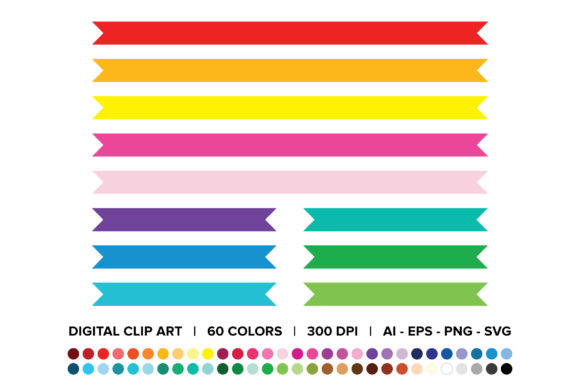
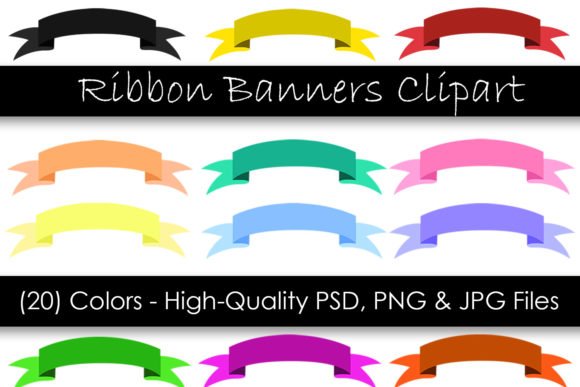
Looking for a quick and easy way to add a touch of elegance to your digital projects? Ribbon Banner Clipart - Digital Clipart offers a versatile solution with 20 vibrant colors, all available in high-quality formats like PSD, PNG, and JPG. These files are designed for instant download, making them perfect for anyone who needs visual elements without the hassle of waiting for shipping.
What Is Ribbon Banner Clipart?
Ribbon Banner Clipart refers to digital images of decorative ribbons that can be used as design elements in various creative applications. These clip art files come in 20 different colors, providing a wide range of options to suit any theme or project. Whether you're working on a website, social media post, or print material, these banners can add a polished look with minimal effort.
The files are provided in three common image formats: PSD, PNG, and JPG. This ensures compatibility with most design software and platforms. Each file is created at 300 DPI, which means they are suitable for both screen display and high-quality printing.
Why Choose Ribbon Banner Clipart?
If you're a beginner or an experienced designer, this collection offers something for everyone. The instant download feature allows you to get started right away, without waiting for delivery. You’ll receive a .zip file containing 20 high-quality images in each format, giving you flexibility in how you use them.
These ribbon banners are ideal for adding a decorative border, highlighting text, or creating eye-catching headers. They can be easily customized using Photoshop or other graphic design tools, allowing you to adjust colors, sizes, and more to fit your specific needs.
Where Can You Use Ribbon Banner Clipart?
The versatility of Ribbon Banner Clipart makes it suitable for a wide range of uses. Here are some practical examples:
- Website Design: Use the banners as header backgrounds or accents in blog posts and landing pages.
- Social Media Graphics: Add a stylish touch to Instagram posts, Facebook covers, or Pinterest pins.
- Print Materials: Incorporate them into invitations, flyers, or promotional posters for a professional finish.
- Educational Projects: Teachers and students can use them in presentations or classroom materials to make content more visually engaging.
- Business Branding: Small business owners can enhance their branding with custom-designed banners that match their brand colors.
With the ability to choose from 20 different colors, you can ensure that your designs remain consistent with your overall aesthetic or theme.
Important Considerations
Before downloading and using Ribbon Banner Clipart, there are a few things to keep in mind:
- Download Requirements: Since this is an instant download, you must download the .zip file on a computer. Mobile devices may not support the download properly.
- File Formats: If you plan to edit the images, the PSD files offer the most flexibility. However, if you need transparent backgrounds, the PNG format is best suited for that purpose.
- Size and Resolution: All files are sized at 7x3 inches and created at 300 DPI, making them suitable for both digital and print use.
These considerations help ensure that you get the most out of your purchase and that your final designs look exactly as intended.
Getting Started with Ribbon Banner Clipart
If you're new to using clip art, here’s a simple way to begin:
Start by downloading the .zip file and extracting the contents. Open the files in your preferred design software, such as Adobe Photoshop or Illustrator. From there, you can place the ribbon banner wherever needed in your project.
You can also use online tools or graphic design platforms like Canva to insert and customize the banners. Many of these tools allow you to upload your own images, making it easy to integrate the clip art into your workflow.
Remember, these files are non-vector, so they won’t scale infinitely without losing quality. For best results, use them at or near their original size.
Real-World Use Cases
Let’s explore a few real-world scenarios where Ribbon Banner Clipart can be especially useful:
Example 1: A small bakery owner wants to create a promotional flyer for a new product launch. By using a red ribbon banner, they can draw attention to the headline while maintaining a festive and appealing look.
Example 2: A blogger is designing a new website layout and needs decorative elements to break up sections of text. Using a gold ribbon banner adds a subtle yet elegant touch to the overall design.
Example 3: An educator is preparing a presentation for a history class and wants to make the slides more engaging. Adding a blue ribbon banner can help highlight key dates or events.
Each of these examples shows how a simple design element can have a big impact on the final outcome.
Ribbon Banner Clipart - Digital Clipart is a valuable resource for anyone looking to enhance their digital or print projects with a quick and easy-to-use design tool. With its wide range of colors, high-quality resolution, and instant availability, it's an excellent choice for creators, professionals, and hobbyists alike.