Retro Camera Clip Art Set: A Timeless Design Resource for Creatives
Designers, marketers, and content creators often find themselves in need of high-quality visual assets that can add a nostalgic flair to their projects. The Retro Camera Clip Art Set offers just that—vintage-inspired camera graphics that are both versatile and visually appealing. Whether you're crafting a vintage-themed website, designing marketing materials, or creating educational content, this clip art set provides a unique way to enhance your work with retro charm.
This article explores the features of the Retro Camera Clip Art Set, common pitfalls to avoid when using it, and practical advice on how to make the most of this design resource. By understanding these aspects, you can ensure that your designs not only look great but also function effectively across various platforms and applications.
What Is the Retro Camera Clip Art Set?
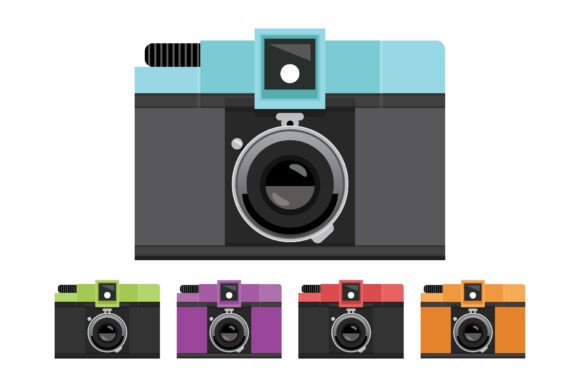
The Retro Camera Clip Art Set is a collection of vintage-style camera illustrations designed to evoke a sense of nostalgia and classic aesthetics. It includes a wide range of elements such as film cameras, instant cameras, lenses, and other related accessories, all rendered in a retro style. This set is ideal for anyone looking to infuse their digital projects with a touch of old-school charm.
What makes this set particularly valuable is its versatility. The included files come in multiple formats, including AI, EPS, PNG, and SVG, ensuring compatibility with a variety of design tools and platforms. Additionally, the set contains bonus versions in classic blue and grey, offering even more creative options for designers.
File Formats and Their Uses
The Retro Camera Clip Art Set comes with several file types to suit different needs:
- AI File (Adobe Illustrator): This editable vector format allows for customization and scaling without loss of quality. Perfect for designers who want to tweak individual elements or integrate them into larger projects.
- EPS File: Another vector format, EPS is ideal for print and high-resolution output. It ensures crisp lines and clear details, making it suitable for professional use.
- PNG and SVG Files: These raster and vector formats are perfect for web use, social media, and digital presentations. The PNG files are high resolution (300 dpi), allowing for scalability while maintaining clarity.
By providing multiple file types, the set ensures that users can choose the best format for their specific project requirements, whether they're working on print, digital, or multimedia content.
Common Mistakes When Using Retro Camera Clip Art Set
While the Retro Camera Clip Art Set is a powerful tool, there are some common mistakes that users might make when choosing or applying it. Understanding these pitfalls can help you avoid unnecessary challenges and ensure that your final designs look polished and professional.
Mistake 1: Not Checking File Compatibility
One of the most frequent issues users encounter is selecting the wrong file type for their project. For example, using an AI file in a platform that doesn't support vector graphics can result in poor quality or distorted images. Always verify which file format is compatible with your design software before downloading.
Better Approach: Before purchasing or downloading the Retro Camera Clip Art Set, check the supported file formats for your design tool. If you're unsure, opt for the PNG or SVG files, which are widely used and easily editable in most graphic design programs.
Mistake 2: Ignoring Scalability Issues
Some users may overlook the importance of scalability when using PNG files. While PNGs are high resolution, they are raster images and can lose quality if scaled beyond their original size. This can be a problem when using them in large-format prints or banners.
Better Approach: For scalable projects, always use the AI or EPS files. These vector-based formats allow for resizing without any loss of detail, making them ideal for logos, posters, and other large-scale designs.
Mistake 3: Overlooking Color Variations
The Retro Camera Clip Art Set includes bonus classic blue and grey versions, which can be a great addition to your design palette. However, many users may not consider how these color variations affect the overall aesthetic of their project.
Better Approach: Experiment with the different color versions to see which one complements your design theme best. The classic blue and grey options offer a subtle, elegant look that can enhance the retro feel of your project.
How to Make the Most of the Retro Camera Clip Art Set
To fully leverage the potential of the Retro Camera Clip Art Set, it's important to approach your design process thoughtfully. Here are a few tips to help you get the best results:
Tip 1: Plan Your Design Theme
Before using the clip art, take time to define the overall theme of your project. Are you aiming for a vintage look? A modern twist on retro? Knowing your design direction will help you select the right elements from the set.
Tip 2: Use Layers and Groups
If you're working with the AI or EPS files, take advantage of layers and groups to organize your design elements. This will make it easier to edit individual components and maintain a clean workflow.
Tip 3: Test Across Different Platforms
Once your design is complete, test it on various devices and screen sizes to ensure that the clip art looks good in all contexts. This is especially important for digital projects like websites or social media posts.
Final Thoughts
The Retro Camera Clip Art Set is a valuable resource for anyone looking to add a touch of nostalgia to their designs. By understanding the available file formats, avoiding common mistakes, and planning your design strategy, you can create visually appealing projects that stand out. Whether you're a beginner or a seasoned designer, this set offers something for everyone, helping you bring your creative vision to life with ease and confidence.