Border Bundle for Creative Projects
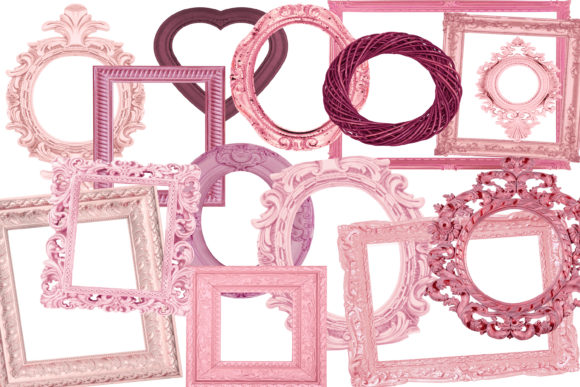
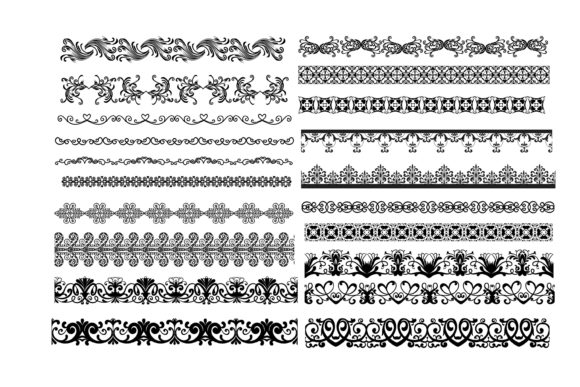
Whether you're a beginner or an experienced designer, the Border Bundle offers a versatile and high-quality collection of design elements that can elevate your creative work. This bundle includes 20 SVG vector files compatible with popular cutting machines like Silhouette Studio Cameo and Cricut, making it easy to bring your ideas to life on physical materials. Alongside these, you also get 20 PNG files with transparent backgrounds, ensuring crisp and clean visuals for digital projects. The set also features 20 EPS files for professional editing in software like Adobe Illustrator, as well as 20 DXF and AI files for even more flexibility in design workflows.
What is Border Bundle?
The Border Bundle is a comprehensive package designed for creators who need high-resolution borders for both digital and physical applications. Each file format included serves a specific purpose, allowing users to choose based on their project needs. For example, SVG files are perfect for use with cutting machines, while PNGs are great for adding borders to websites, social media posts, or digital presentations. The inclusion of multiple file types ensures that whether you're working on a print project or a digital one, you have the right tools at your disposal.
Why Choose Border Bundle?
If you're looking for a reliable and flexible resource for your creative projects, the Border Bundle is an excellent choice. It’s particularly useful for those who want to maintain consistency across different platforms. For instance, a small business owner might use the PNG files to add branded borders to marketing materials, while the SVG files could be used to cut custom border designs for packaging or signage. The transparent background feature in PNG files makes them ideal for overlays, logos, or any design where the background needs to remain visible.
- High resolution: All files are 300 dpi, ensuring sharp and clear results whether you're printing or displaying digitally.
- Multiple formats: From SVG to AI, the bundle caters to a wide range of design software and hardware.
- Time-saving: Instead of designing borders from scratch, you can use ready-made options that fit various styles and themes.
Uses for Border Bundle in Real Life
The versatility of the Border Bundle makes it suitable for a variety of personal, professional, and educational uses. Here are some practical examples:
For bloggers and content creators: Use PNG borders to frame images in blog posts or social media content. This adds a polished look without the need for advanced graphic design skills.
For educators: Incorporate SVG files into classroom projects or printable worksheets to create visually appealing borders around text or illustrations.
For entrepreneurs: Customize packaging or product labels with unique borders using the DXF files, which are compatible with many design programs and cutting machines.
For hobbyists: Create personalized scrapbook pages or DIY greeting cards with borders that match your theme or color scheme.
Getting Started with Border Bundle
If you're new to using design bundles like the Border Bundle, it's helpful to start by understanding which file types best suit your project. For example, if you're using Silhouette Studio or Cricut, focus on the SVG files. If you're editing in Adobe Illustrator, the AI and EPS files will give you full control over the design. Always check the resolution and file size before importing to ensure compatibility with your software.
Beginners may find it useful to experiment with different borders in a simple project first, such as creating a themed border for a digital collage or a printed poster. As you become more comfortable, you can explore more complex uses, like integrating borders into larger design layouts or combining them with other clipart elements.
Important Considerations Before Using Border Bundle
While the Border Bundle is highly versatile, there are a few things to keep in mind before using it. First, make sure your design software supports the file types included. While most modern programs handle SVG and PNG files easily, EPS and AI files may require Adobe Illustrator or similar software for full editing capabilities.
Additionally, consider how the borders will be used in your final project. If you're printing, always verify that your printer can handle 300 dpi files for optimal quality. If you're using the borders for online content, check that they are sized appropriately for the platform you're working on, such as Instagram, Facebook, or a website.
Lastly, think about licensing and usage rights. Ensure that the bundle you purchase allows for the intended use, especially if you're planning to sell products or use the borders commercially.
Tips for Maximizing the Value of Border Bundle
To get the most out of your Border Bundle, try combining different border styles within a single project. This can add visual interest and help unify your design. For instance, use a bold border for headings and a subtle one for body text in a digital layout.
You can also layer borders with other design elements, such as icons or text, to create more dynamic compositions. Experimenting with colors, sizes, and placements can lead to unexpected and creative results.
Don’t hesitate to reach out to the creator or community for tips and tricks. Many designers share resources and tutorials that can help you learn new techniques and expand your creative possibilities.